


Book of Lore#
Since we know how to point and click in Ren’Py, why don’t we apply that knowledge to making a Book of Lore?
(All the scripts and pictures of this chapter can be downloaded
here. Hyperlinks will not
work! To get them working, see the next tutorial!)
We’ll manage data structures (the system of articles) and we’ll create browsing navigation, including history with Back and Forward buttons and tooltips:
Lore Dictionary#
First we’ll need data, such as articles for our lorepedia. I put them in
a separate file (articles.rpy) to manage future expansion
easily, though it’s not a requirement:
default articles = {
    "Anarchs":
        """
        Anarchs are {a}vampires{/a} who reject the status quo
        of {a}Cainite{/a} society.

        They especially resent the privileged status held
        by {a}elders{/a} within the {a}Camarilla{/a} and other vampire
        sects.
        """,
    "Brujah":
        """
        The Brujah are one of the thirteen {a}clans{/a} of
        {a}Kindred{/a}.

        Prominent members of Brujah belonged to the
        {a}Camarilla{/a}, the {a}Sabbat{/a}, and the {a}Anarchs{/a}.
        """,
    "Camarilla":
        """
        The Camarilla is the most organized of the
        vampiric {a}sects{/a}, an elite club that favours
        tradition and control of the mortal populace
        from behind the scenes.

        Due to recent events many of Camarilla {a}elders{/a}
        don't let {a}Anarchs{/a}, {a}Caitiff{/a}, or {a}thin-blooded{/a}
        vampires settle in their Domains.
        """,
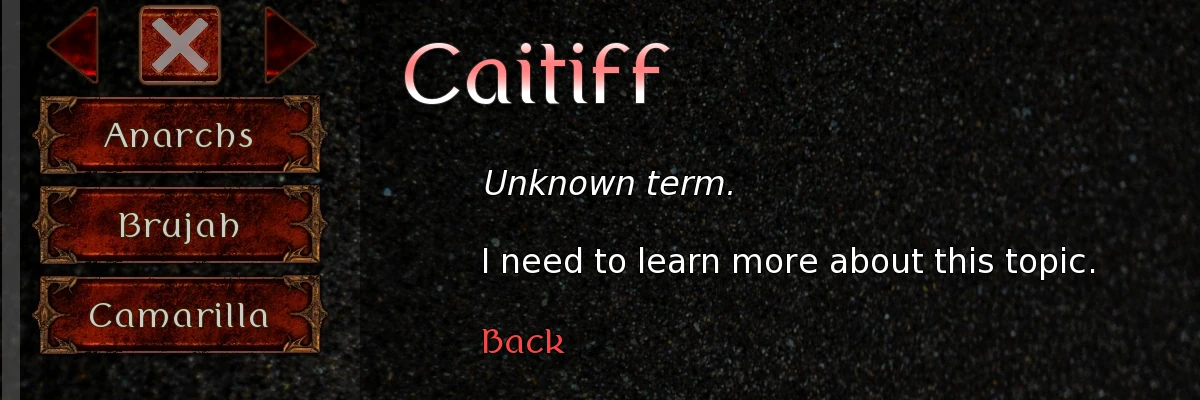
    "":
        """
        {i}Unknown term.{/i}

        I need to learn more about this topic.

        {a}Back{/a}
        """,
    }
We have the data as a dictionary (Python dict),
where article titles serve as keys and article texts as values. There is
also an article with the empty title. It will serve as placeholder for
terms that player doesn’t know yet.
Lore Function#
We’ll have a set viewed to store titles that player have seen,
so that we could highlight titles with new information.
(More on that in the next part of the tutorial.)
To navigate with back and forward buttons, we’ll have a
list lore_history, initially empty, to append
the titles of visited articles to that list.
Variable lore_hist_n will be the index of currently shown title
in that list. Usually it will be -1, which means “first from the
end”, i.e. the last item in the list. But when we click “Back” button,
we’ll move to the previously visited article, and lore_hist_n
will become -2.
This way we could always know which article is “previous” in the navigation history and which is “next”.
To show an article from Book of Lore, we’ll call function lore::
default viewed = set()
default lore_history = [ ]
default lore_hist_n = -1

init python:
    def lore(topic, history=0):
        if history:
            store.lore_hist_n += history
            topic = store.lore_history[store.lore_hist_n]
        elif topic:
            store.viewed.add(topic)
            if store.lore_hist_n < -1:
                del store.lore_history[store.lore_hist_n+1:]
                store.lore_hist_n = -1
            if not store.lore_history or store.lore_history[-1] != topic:
                store.lore_history.append(topic)
                store.lore_hist_n = -1

        if renpy.get_screen("lorepedia"):
            renpy.hide_screen("lorepedia")
            renpy.show_screen("lorepedia", topic)
        else:
            renpy.call_screen("lorepedia", topic)
This function can be called in two ways:
If parameter
historyis not zero, then it’s an integer commanding to jump back or forward in navigation history. E.g. if it’s-1, it means “show the previous article in the navigation history”. And if it’s1, likewise, it means “show the next article”.If parameter
historyis zero, then parametertopicwill be used, to show the article with that title. We’ll add that title to the setviewed, and manage the navigation history:If there are items in “Forward” history, we’ll delete them.
We’ll add the current title as the newest navigated item.
After all the data has been managed, function lore calls screen
“lorepedia” with the title of the article to show as the parameter.
Lore Screen#
Screen “lorepedia” has two main areas:
A scrollable Viewport on the left, with “history navigation” imagemap and buttons for every article.
An article area on the right, to display the contents of the current article.
The viewport is made thusly:
screen lorepedia(titel):
    add "bg_lorepedia"
    viewport:
        area (0, 0, 340, 1080)
        scrollbars "vertical"
        mousewheel True
        draggable True
        style_prefix "lore"
        vbox:
            imagemap auto "btn_lore_%s.webp":
                xysize (300, 90)
                hotspot (0, 0, 100, 90):
                    action Function(lore, None, -1)
                    sensitive (len(lore_history)+lore_hist_n > 0)
                    if len(lore_history)+lore_hist_n > 0:
                        tooltip lore_history[lore_hist_n-1]
                hotspot (100, 0, 100, 90):
                    action Return()
                hotspot (200, 0, 100, 90):
                    action Function(lore, None, 1)
                    sensitive (lore_hist_n < -1)
                    if lore_hist_n < -1:
                        tooltip lore_history[lore_hist_n+1]

            for a in articles:
                if a:
                    button:
                        xysize (300, 90)
                        if len(a) > 15:
                            text a size 24
                        elif len(a) > 11:
                            text a size 28
                        else:
                            text a
                        action Function(lore, a)
First, look how the navigation imagemap works:

The hotspot in the middle (“exit”) just returns from the screen:
hotspot (100, 0, 100, 90):
    action Return()
The hotspot on the left (“Back”, or “Previous”), is sensitive
only when there are articles visited before the current one:
hotspot (0, 0, 100, 90):
    action Function(lore, None, -1)
    sensitive (len(lore_history)+lore_hist_n > 0)
    if len(lore_history)+lore_hist_n > 0:
        tooltip lore_history[lore_hist_n-1]
The tooltip shows the title of that “previous” article.
Likewise, the hotspot on the right (“Forward”), is sensitive
only when we returned back in navigation history, so that there are
articles “forward”:
hotspot (200, 0, 100, 90):
    action Function(lore, None, 1)
    sensitive (lore_hist_n < -1)
    if lore_hist_n < -1:
        tooltip lore_history[lore_hist_n+1]
The rest of the viewport contents is simple: just article titles from
dict articles, shown on buttons. (If the length of the title is
large, it’s shown with reduced font sizes.)
The rightmost area of the screen “lorepedia” shows the article’s contents:
frame:
    area (360, 0, 1520, 1080)
    padding (40, 4)
    background "#0008"

    if renpy.can_show(titel.lower()):
        add titel.lower() xalign 1. ypos 60

    text titel style "lore_title" at gradient_v

    if titel in articles:
        text articles[titel] style "lore_article"
    else:
        text articles[""] style "lore_article"
Here with function renpy.can_show() we check if there is an
image named as the article’s title, converted to lowercase. In that case
the image is shown in the top-right corner. For example, if article is
named “Camarilla”, an image “camarilla” will be shown, if exists.
Finally, if requested article does not exist in dict articles,
then the placeholder text will be shown for that title.
The screen also shows tooltips (see Example):
$ tooltip = GetTooltip()

if tooltip:

    nearrect:
        focus "tooltip"
        prefer_top False

        frame:
            background "#904"
            xalign 0.5
            text tooltip style "tooltip"
Conclusion#
Here’s the last part of the main script, showing the usage of the Book of Lore:
label start:
    $ _confirm_quit = False
    "What do you know about {a}Caitiff{/a}?"
    window hide
    $ lore("Caitiff")
    "So, nothing?.. Well, let me tell you a story that happened—"
    return

# Credits:
# Frame https://mollycat2020.picmix.com
# Blood Splatter https://www.freeiconspng.com/img/44472
# Lore Pictures: Vampire The Masquerade, fair use (educational)
Apart from these scripts, I created separate files styles.rpy
with styles and hyperlink.rpy (which we’ll develop more later,
in chapter Hyperlinks). All the files of this tutorial can be
downloaded, placed in a new
Ren’Py 8 project (overwriting the original contents) and run.
(Hyperlinks will not work! To get them working, see the
next tutorial.)
Have fun!